Jobber alternatives · 10 min read
Jobber Alternatives With AI Scheduling and Quote Drafting
Looking for a Jobber alternative with AI scheduling and quote drafting? See how Fieldmox, Housecall Pro, Workiz and GorillaDesk compare for 5-50 person teams.
Nasim Updated
Fieldmox is a Jobber alternative for 5-50 person field service teams that have outgrown a simple job app but don't want an enterprise suite. Its AI copilot drafts quotes on every plan and, on Pro, drafts next week's schedule by route, skills and who's off. Your office reviews and sends everything. Housecall Pro, Workiz and GorillaDesk are also worth a look, and each is best for something different, as covered below.
Who should switch from Jobber
This page is for owners and office managers running a field crew of roughly 3-20 technicians with 1-3 people in the office. You are probably on Jobber, Housecall Pro or spreadsheets, and the same things keep eating your evenings:
Building next week's schedule by hand
Retyping quotes from emails and site notes
Writing service reports after the fact
Chasing unpaid invoices and quotes nobody followed up
That work takes little judgment, yet the people with the most judgment in your company are the ones doing it. A good alternative gets you a useful first draft, so the office reviews instead of creating from scratch.
What to look for in a Jobber alternative
Before comparing logos, decide which of these you need:
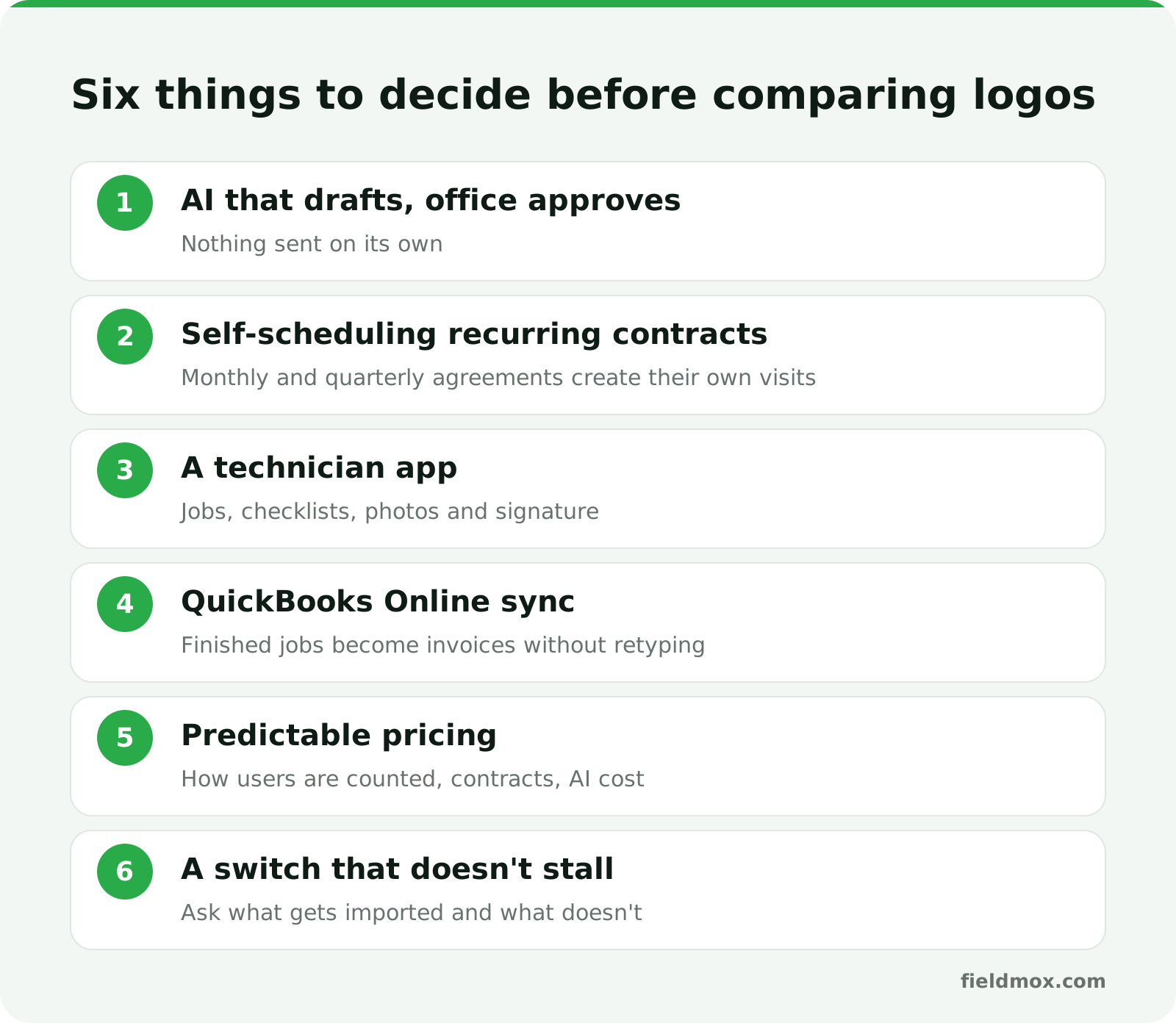
AI that drafts and your office approves. Look for AI that works from your real jobs, clients, prices and team, and that doesn't send anything on its own. You want to stay in control of what reaches a customer.
Recurring contracts that schedule themselves. Monthly and quarterly service agreements should create their own visits, not live on a spreadsheet.
A technician app. Today's jobs, checklists, photos and customer signature on iPhone and Android.
QuickBooks Online sync. Finished jobs should become invoices that land in your books without retyping.
Pricing you can predict. Check how users are counted, whether there is a contract, and whether AI costs extra.
A switch that doesn't stall your week. Ask exactly what gets imported and what doesn't.
How Fieldmox works
Fieldmox is AI-first field service software. Quotes, scheduling and dispatch, a technician app, recurring contracts, service reports and invoicing run in one place. The copilot was built into the product from day one. It works from your actual jobs, clients, prices and team, not from a generic chat window.
The rule is simple: the copilot suggests and drafts, and people review and decide. Nothing goes out until someone on your team sends it, and everything the copilot touches is logged.
The AI features, by plan
What the copilot does | How it helps | Plan |
|---|---|---|
Drafts quotes | Builds the quote from the request, the site and your price list. You check, tweak and send. | Essentials, Pro, Unlimited |
Drafts service reports | Fills the report from what the tech captured on site, on your letterhead. | Essentials, Pro, Unlimited |
Drafts next week's schedule | Plans by route, skills and who's off. The dispatcher approves. | Pro, Unlimited |
Lines up finished jobs for invoicing | Every finished job is ready to invoice (per job, monthly or per contract). The office reviews the batch. | Pro, Unlimited |
Drafts payment and quote reminders | Reminders for unpaid invoices and open quotes. You decide what goes out. | Pro, Unlimited |
Answers questions about your business | Ask things like "Who's free Thursday?" | Unlimited |
There are no per-AI-action fees. AI is included in the flat monthly price.
One honest note on plans: the $99 Essentials plan includes AI quote and report drafts, but not the scheduling copilot, invoice batching or reminders. Those start on Pro at $149.
What's in every Fieldmox plan
Quotes, jobs, scheduling and invoicing in one place, with drag-and-drop scheduling and dispatch
Recurring jobs that schedule themselves (monthly, quarterly, whatever the agreement says)
A technician app for iPhone and Android: today's jobs, arrived, checklists, photos and customer signature
Arrival and finish stamped with time and the tech's location
Service and inspection reports on your letterhead
One tap from a finished job to an invoice
QuickBooks Online sync (invoices sync to QBO) and Stripe payments
Google Calendar, so jobs show on your calendar
Pricing and how users are counted
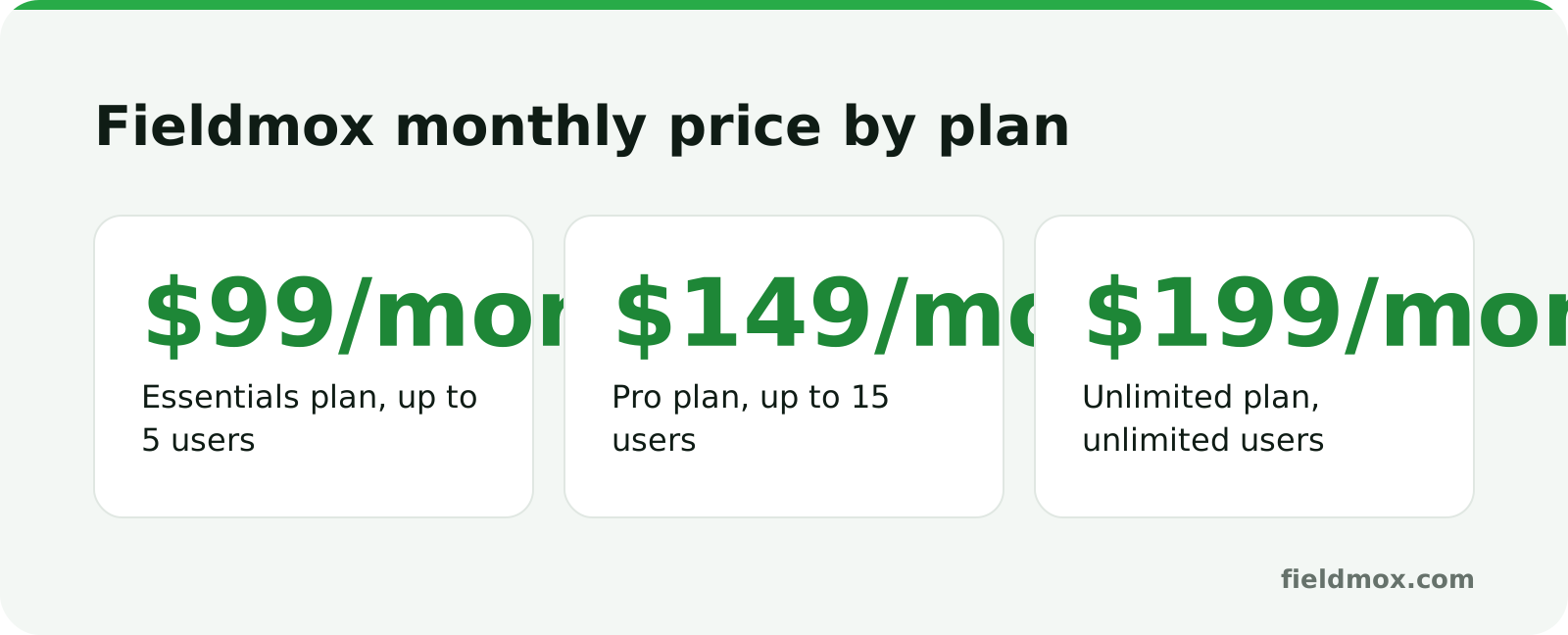
Essentials | Pro | Unlimited | |
|---|---|---|---|
Price | $99/month | $149/month | $199/month |
Users | Up to 5 | Up to 15 | Unlimited |
Setup and data import | Done with you | Done for you | Done for you |
All plans are month to month with no contract and no setup fee, and you can change plan or cancel any time from settings. There is no free plan, free trial or annual billing on the site.
A user is anyone who signs in: owner, office staff and technicians. Client portal users are free and unlimited. So an owner, one office person and three techs is 5 users. If that team wants the AI to draft next week's schedule, that's Pro at $149.
How the main alternatives compare
The table below uses only what each company says on its public homepage and pricing page, as we reviewed them for this article. Some competitor pages were incomplete, so "not confirmed" means we didn't find it, not that the feature is missing. Fieldmox details were checked against fieldmox.com on October 30, 2026. Prices change, so confirm on each vendor's site before you decide.
Fieldmox | Jobber | Housecall Pro | Workiz | GorillaDesk | |
|---|---|---|---|---|---|
Listed pricing | $99 / $149 / $199 per month | Plans from $29/mo billed annually; Plus is $499/mo (5 users) to $699/mo (15 users); extra users $29/mo | From $59/mo billed annually; higher tiers not confirmed | Standard, Pro, Ultimate: request pricing | Per route: Basic $49, Pro $99, Growth $149 for the first route |
Contract | Month to month, no setup fee | Plus listed as no commitment | Annual billing discount listed | Not confirmed | No contracts |
Free trial | None | Yes, no card | 14 days, no card | 7 days | 14 days |
How users are priced | Everyone who signs in counts; plan caps at 5, 15, unlimited | Extra users $29/mo | Not confirmed | Not confirmed | Unlimited users |
AI emphasis on their pages | Back office: drafts quotes, reports, schedule (Pro), invoice batches (Pro), reminders (Pro) | AI that helps price jobs; an AI-powered Receptionist | AI CSR that answers calls and books jobs | "Genius scheduling" listed in Pro; Genius Answering sold as an add-on | Built-in agents for calls, quotes and follow-ups (per its site description) |
Best for | 5-50 person teams that want AI drafts for the office plus one system | Everyone from solo contractors to 15+ person teams who want a broad, well-known toolset | Teams who want a very wide suite, including payroll, GPS, financing and call answering | Teams who want phone and AI answering in the same ecosystem | Pest control companies that want per-route pricing and pest-specific tools |
The list prices above are not feature-matched, so don't read them as like-for-like. Compare the plan that has the features you need.
ServiceTitan and FieldRoutes are also worth knowing. Both list pricing as request-only, and ServiceTitan is built for larger, more complex operations. FieldRoutes is focused on pest control and lawn care.
Fieldmox vs Jobber
Both cover quote to payment, scheduling, a client-facing workflow and QuickBooks-friendly invoicing. The differences come down to where the AI points and how you're billed.
Where Fieldmox fits better: you want AI aimed at office paperwork. Quote drafts, report drafts, next week's schedule, invoice batches and reminders all come as drafts for your office to approve. You also get flat monthly pricing with AI included, no contract, and free import from your old system.
Where Jobber is the stronger pick: Jobber is a large, established platform with a broad toolset, including a sales pipeline, marketing tools and an AI-powered Receptionist. It offers a free trial and plans that start lower than $99 for very small teams. Fieldmox is not a CRM and has no sales pipeline, and we don't position it as a call-answering product. If lead handling is your main problem, Jobber or another tool built around it may fit better.
Switching from Jobber or spreadsheets
Migration is free on every plan, and our team does the import. Setup is done together with you on Essentials and done for you on Pro and Unlimited. Full details are on the switching page.
From Jobber (and from Housecall Pro, ServiceTitan, PestPac, FieldRoutes, Workiz, GorillaDesk or ServiceM8), we bring across:
Clients, contacts and billing details
Sites and service addresses
Products, services and price lists
Recurring contracts and schedules
Open quotes and upcoming jobs
Team, roles and permissions
Quote, report and invoice templates
Job history and notes
What doesn't move: past invoices are not migrated as invoices. They stay in your accounting system, so keep your books in QuickBooks Online as you do today. Invoices from newly finished jobs sync back to it.
From spreadsheets: Excel, Google Sheets or CSV files work, and messy files are fine. Clients, sites, price lists, recurring contracts, visit schedules, upcoming jobs and notes all come across.
Timing: most teams are live usually within a week. Years of history or lots of sites take longer, and we won't promise a date before we've seen your data. You can run both systems side by side until you trust the new one. If you're under contract elsewhere, we can move your data and train your team now, and you switch when the contract ends. If you ever leave Fieldmox, you take your data with you.
When Jobber is enough
Stay on Jobber if:
You're a solo operator or a very small crew and a lower-priced plan covers you
You want a free trial before talking to anyone
Lead capture, marketing tools or an AI receptionist matter more than office paperwork
Your schedule, quotes and invoices are already manageable, and your evenings are your own
The teams who tend to outgrow a job app are the ones where one or two people in the office are spending hours each week on creation work: building schedules, typing quotes, writing reports and chasing money. That's the problem Fieldmox is built for.
Which Fieldmox plan fits
Essentials ($99): up to 5 users, with AI quote and report drafts. Fits the smallest teams.
Pro ($149): up to 15 users. Choose this if you want the scheduling copilot, invoice batching, reminders, clients with many sites, a client portal, your own templates, or roles and permissions. Any of those means Pro, whatever your headcount.
Unlimited ($199): unlimited users, plus asking the copilot about your business, e-signatures on contracts and quotes, custom fields, and API and webhooks.
For example, an owner with 2 office staff and 10 techs is 13 users, which lands on Pro.
FAQ
What is the best Jobber alternative with AI scheduling and quote drafting?
It depends on what you need. Fieldmox drafts quotes on every plan and drafts next week's schedule on Pro, with your office approving both. Housecall Pro and Workiz put more of their AI emphasis on call answering. GorillaDesk is pest-control-specific. Match the tool to your biggest time sink.
Does Fieldmox's AI send quotes or messages on its own?
The copilot suggests and drafts, and people review and decide. Nothing goes out until someone on your team sends it, and everything the copilot touches is logged.
Is the AI scheduling included in the $99 plan?
Essentials includes AI quote and report drafts. The scheduling copilot, invoice batching and payment reminders start on Pro at $149 per month.
Does Fieldmox charge extra for AI?
There are no per-AI-action fees. Pricing is flat per month, month to month, with no contract and no setup fee.
Can I move my Jobber invoice history to Fieldmox?
Not as invoices. Past invoices stay in your accounting system. Clients, sites, price lists, recurring contracts, open quotes, upcoming jobs, templates, and job history and notes are imported free.
Is there a free trial?
Fieldmox has no free plan or trial. The way to try it is a short video call with a founder, where we show it on your kind of work and put together a switch plan. You can also run Fieldmox alongside your current system until you're ready.
See it on your own work
Book a short call with a founder. No contract. We'll walk through your quotes, schedule and recurring jobs, and map out a switch plan and go-live date. Book a meeting.